Your Portal Version: 1.0.5
Your phpBB Type: Standard phpBB3
MODs installed: Yes
Your knowledge: Beginner
Boardlink: http://csp.lt/forum
What have you done before the problem was there?
What have you already tryed to solve the problem?
How to make this mchat Mod to be in board3 footer?
Because i need to go to Main forum to see mchat in footer i need to see too on board3
Mchat with Board3
Forum rules
Before creating a new support thread, please take a look in the board3 Portal FAQ and use the search!
Many questions have already been answered.
Before creating a new support thread, please take a look in the board3 Portal FAQ and use the search!
Many questions have already been answered.

Re: Mchat with Board3
How to make this mchat Mod to be in board3 footer?
Because i need to go to Main forum to see mchat in footer i need to see too on board3
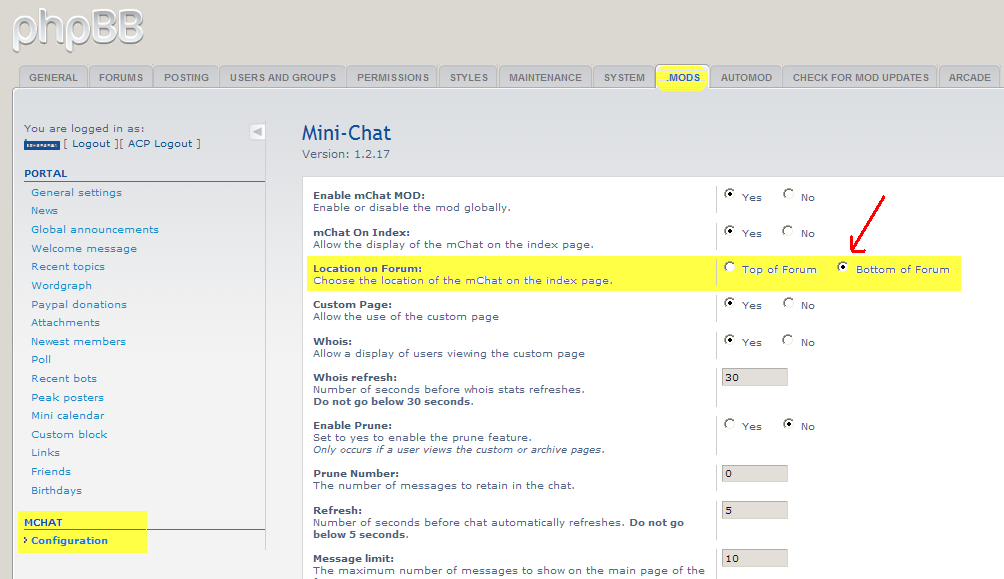
Try logging in as Admin/ACP, go yo your "mods" tab. Click on mChat Configuration on the left side menu. It will allow you to change the location of mChat to either top or bottom of Forum and it should show up the same in Board3 Portal.
I've tried it on mine and it will change both Forum and Board3 mChat to top or bottom .
Re: Mchat with Board3
For me doesnt work can you PM me your website i try to look at your portal...
Re: Mchat with Board3
So how to make?
here instaliation : http://www.phpbb.com/community/viewtopi ... &t=1870815
And i think you need to make this default Block
Because Portal doesnt have shoutbox....
here instaliation : http://www.phpbb.com/community/viewtopi ... &t=1870815
And i think you need to make this default Block
Because Portal doesnt have shoutbox....
Re: Mchat with Board3
Help someone
Re: Mchat with Board3
edgaras85,
Can you make a link to where you downloaded your Style for your forum. What is the name of the Style?
I am not sure that I can fix the problem, but I will give it a try.
I think the problem is simple , like editing some of the Portal files to include your Style so that it will be visible in Portal as well as in Forum.
Also , you can create a stylesheet for mChat that will match the background colors of your Style
Can you make a link to where you downloaded your Style for your forum. What is the name of the Style?
I am not sure that I can fix the problem, but I will give it a try.
I think the problem is simple , like editing some of the Portal files to include your Style so that it will be visible in Portal as well as in Forum.
Also , you can create a stylesheet for mChat that will match the background colors of your Style
Re: Mchat with Board3
edgaras85,
Have you tried marc's fix for including mChat for Board3 Portal ? viewtopic.php?f=21&t=3699
Find this line in your styles/prosilver/template/portal/portal_center
Add after
This will put mChat after the Who's online block .
Have you tried marc's fix for including mChat for Board3 Portal ? viewtopic.php?f=21&t=3699
Find this line in your styles/prosilver/template/portal/portal_center
Code: Select all
<!-- IF S_DISPLAY_ONLINE_PORTAL_LIST and S_DISPLAY_ONLINE_LIST -->
<!-- INCLUDE portal/block/whois_online.html -->Code: Select all
<!-- INCLUDE mchat_body.html -->Re: Mchat with Board3
Woohhoo THANKS 
now veryl little problem
its very small :
How i can make bigger in left and right side like i show in Image
Thanks
now veryl little problem
its very small :
How i can make bigger in left and right side like i show in Image
Thanks
Re: Mchat with Board3
Nice 
Glad to see it work.
Also that is the size on the Board 3 Portal center block based on your style's template because it will allow left & right side blocks to be added.
What is the link to where you found that style? I will look at it.
Glad to see it work.
I think it is because your style's template is designed to be that wide. I am not sure if it is adjustable, As I am not familair with that style.edgaras85 wrote:Woohhoo THANKS
now veryl little problem
its very small
Also that is the size on the Board 3 Portal center block based on your style's template because it will allow left & right side blocks to be added.
What is the link to where you found that style? I will look at it.
Re: Mchat with Board3
style called : Melankolia
Re: Mchat with Board3
edgaras85,
To make your forum mChat look complete, the last thing you could do is make the background in mChat have the same colors as the rest of your forum instead of having Subsilver2 colors.
#1)
create a stylesheet for mChat. You can make a copy of your mchat_subsilver2.css found in your root directory > mchat folder. Use that copy and rename it mchat_Melankolia.css
Then open mchat_Melankolia.css to edit it and replace the code with this code.
#2)
Then you will need to edit your overall_header.html for Melankolia
Root > styles > Melankolia > template
Find
Change to
It will be case sensitive so be sure you spell it the same ( Melankolia.css )
Then go and Purge the cache
Refresh your forum and the background should match.
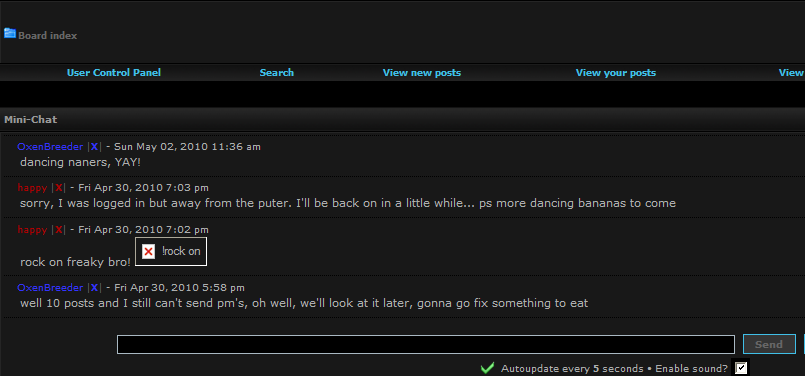

To make your forum mChat look complete, the last thing you could do is make the background in mChat have the same colors as the rest of your forum instead of having Subsilver2 colors.
#1)
create a stylesheet for mChat. You can make a copy of your mchat_subsilver2.css found in your root directory > mchat folder. Use that copy and rename it mchat_Melankolia.css
Then open mchat_Melankolia.css to edit it and replace the code with this code.
Code: Select all
/**

*

* @package mChat Subsilver2 Style

* @version 1.3.1 22.08.2009

* @copyright (c) djs596 ( http://djs596.com/ ), (c) RMcGirr83 ( http://www.rmcgirr83.org/ ), (c) Stokerpiller ( http://www.phpbb3bbcodes.com/ )

* @license http://opensource.org/licenses/gpl-license.php GNU Public License

*

**/


/* mChat

------------ */

div.mChatBG1 {

	background-color: #181818;

	padding: 5px 5px 5px 15px;

	border-bottom: 1px dotted #000000;

	overflow: hidden;

}


div.mChatBG2 {

	background-color: #181818;

	padding: 5px 5px 5px 15px;

	border-bottom: 1px dotted #000000;

	overflow: hidden;

}


div.mChatRowLimit {

	overflow: auto;

	width: 100%;

	height: 200px;

}


div.mChatRowLimitCustom {

	overflow: auto;

	width: 100%;

	height: 500px;

}


div.mChatPanel {

	text-align: center;

	padding: 5px;

}


input.mChatText {

	cursor: text;

	width: 50%;

	border: 1px solid #A9B8C2;

	color: #000000;

	padding: 3px 5px 3px 5px;

	margin: 5px 0px 0px 5px;

}


input.mChatText:hover {

	border-color: #11A3EA;

}


input.mChatButton {

	width: auto;

	font-weight: bold;

	background-color: #353535;

	border: 1px solid #40bfe7;

	cursor: pointer;

	padding: 2px 5px 2px 5px;

	margin: 5px 0px 0px 5px;

	font-size: 1.1em;

}


input.mChatButton:hover {

	border-color: #40bfe7;

	color: #40bfe7;

}


div.mChatHover:hover {

	background-color: #1d1d1d;

}Then you will need to edit your overall_header.html for Melankolia
Root > styles > Melankolia > template
Find
Code: Select all
<link rel="stylesheet" href="{ROOT_PATH}mchat/mchat_Subsilver2.css" type="text/css" />
Code: Select all
<link rel="stylesheet" href="{ROOT_PATH}mchat/mchat_Melankolia.css" type="text/css" />Then go and Purge the cache
Refresh your forum and the background should match.
Re: Mchat with Board3
Thanks i will test
now my hosting fucked up
now my hosting fucked up
Re: Mchat with Board3
I copied all but still small..

I need that mchat would go in right,left and center bodys...
I need that mchat would go in right,left and center bodys...
Re: Mchat with Board3
That looks better.
Although I do not know how or if possible to make just mChat wider without making the entire style/template wider, all together.. I believe it has to do with your style's default template settings. I have not attempted to this yet.
Although I do not know how or if possible to make just mChat wider without making the entire style/template wider, all together.. I believe it has to do with your style's default template settings. I have not attempted to this yet.
Re: Mchat with Board3
Maybe someone know how to make that mchat will go in left,right and center bodys? not only center....
And thanks cLinch3r for your Help
And thanks cLinch3r for your Help
